About Predefined Applicative Rules
Below is the way to implement the intelligence that checks whether the Home is compliant with manufacturer business rules:
- Applicative rules: These rules define the behavior in a specific scenario at the Home level. Such rules describe the interaction between cabinets, walls, and so on. They are predefined.
Applicative rules are organized as follows:
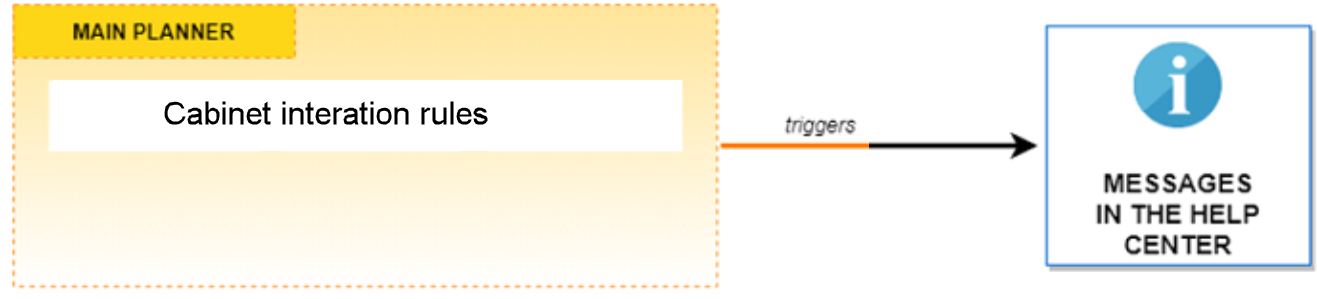
Check Rules
Check rules are triggered by specific closed tags or options. They notify the user that some business rules are not obeyed in the current design and display a message in the Help Center. As below:
- Main Planner rules
Notification Level
Notifications have two possible levels in the Home application:
| Level | Icon | Description |
|---|---|---|
| Recommendation | ℹ | Changes are suggested to the user to avoid planning an invalid home, but they are not mandatory. |
| Warning or Critical | ⚠ | Changes are mandatory because it affects safety in the home, the user must fix it to proceed. Note: both Warning and Critical criticity levels are displayed in the same category in the Home application. Some other applications might choose to differentiate those two levels. |
The Help Center counts the notifications for each level, so that the user remains aware of the modifications to perform on her/his home.
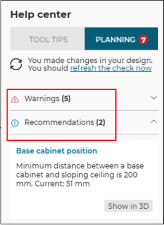
Notes:
- When the rule for expired products is implemented and if expired products are present in the home, the corresponding notifications are displayed in a separated section in the help center. The criticity level of this particular business rule is not taken into account.
- The section titles in the help center can be changed via translations (
planner.help_center.recommendations_label,planner.help_center.warnings_labelandplanner.help_center.expired_products_label).