Print widget
Objective
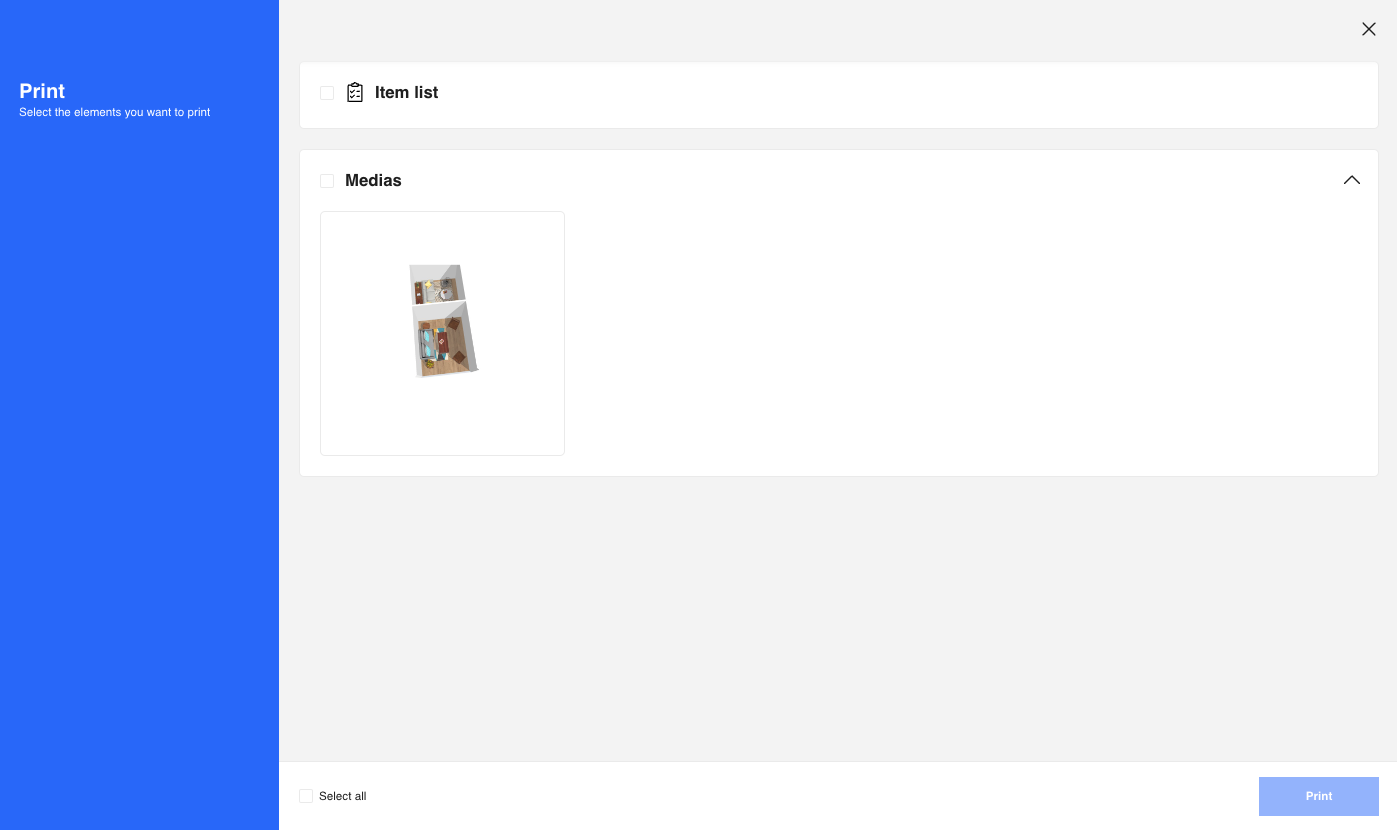
Print enables user to print item list and media list of the current project. This widget has two versions, the embed version is the one integrated in HomeByMe For Home Retailers planner, the fullpage version is the one integrated in Bryo Home Website. According to different integration context, the widget has different manners of inteactions with the integration context.
Widget Overview
Access
User can have access to Print from Home Retailer Application and Bryo Home Website.
From Home Retailer Application
1. Access from project overview widget

2. Access from Application top bar menu

From Bryo Home Website
1. Access from the first tab on project page: Project Overview

2. Access from the second tab on project page: Items List

3. Access from the third tab on project page: Medias List

Context
Like other default widget, Print should be embeded in the application as an iframe, the communication between the application and default widget should be established on iframe messages. To have an overview of the subjet, please refer to window.postMessage().
Every Message published or subscribed by the Print default widget should respect the following format:
| Key | Type | Description |
|---|---|---|
| event | String | Name of the event, which is used as unique identifier |
| content | Object | Content of the event, which brings arguments helps to event handling |
Example
{
  "event": "event name",
  "content": {
    "key1": "value for key1",
    "key2": "value for key2"
  }
}
Overview of the Synchronization Process
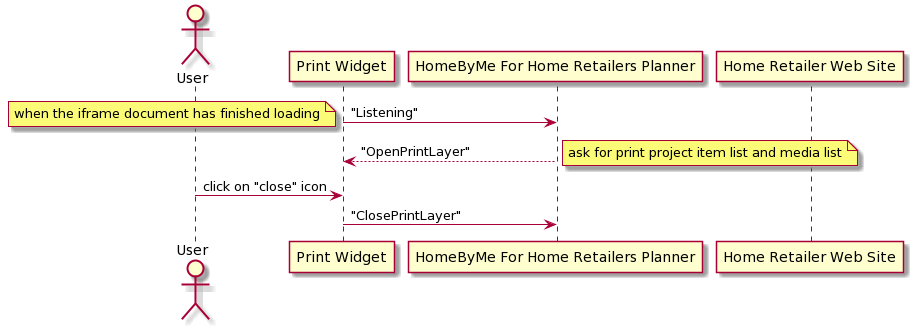
The following sequence disgram explains possible data synchronization between Application and Print default widget.
Published Events (Output events)
Published events are those events go from default widget to application.
"Listening"
Context
When the document and all sub-resources have finished loading, send "Listening" event to inform the application(parent window) that it is ready to listen to parent window messages. This event must ben sent once and only once.
Message Format
| Key | Type | Value/Template | Description |
|---|---|---|---|
| event | String | "Listening" | - |
Message Example
{
    event: "Listening",
}
"ClosePrintLayer"
Context
When the user click on "close" icon on the Print default widget, send "ClosePrintLayer" event to inform the application that the default widget has been destroyed.
Message Format
| Key | Type | Value/Template | Description |
|---|---|---|---|
| event | String | "ClosePrintLayer" | - |
Message Example
{
  "event": "ClosePrintLayer"
}
Subscribed Events (Input events)
Subscribed events are those events go from application to default widget.
"OpenPrintLayer"
Context
When the default widget has finished being loaded, application will send this event to Print default widget ask for print item list and media list of the project.
Message Format
| Key | Type | Value/Template | Description |
|---|---|---|---|
| event | String | "OpenPrintLayer" | |
| content | Object | name: String description: String updateDate: String rawMedias: Array translation: Object language: String namespace: String roomsBOM: Array outsideBOM: Object projectBOM: Array | - name: Name of the project - description: Description of the project - rawMedias: For every media, show media url, type etc.... - translation: Mapping of translations, with which to override the default one in widget - language: locale code - namespace: namespace - roomsBOM: Array of furnitures in the project for each room - outsideBOM: An object with a "furnitures" entry, an array of all the furnitures outside the building - projectBOM: Array of decorations applied in the project |
Message Example
{
  "event": "OpenPrintLayer",
  "content": {
    "name": "project with bench",
    "description": "",
    "updateDate": "Wed, 22 Jul 2020 14:00",
    "rawMedias": [
      {
        "id": 17240,
        "creationDate": "2020-07-21T09:17:19.000Z",
        "url": "https://byme-enterprise-preprod-stgg.s3.eu-west-1.amazonaws.com/data/homebymeProjects/2B0CD57A-9C4D-400A-8E9C-3BC705E76746/images/thumbnails/thumbnail960x540.jpg",
        "name": "thumbnail960x540.jpg",
        "typeMediaID": 5,
        "metadata": {}
      }
    ],
    "translation": {
      "print": {
        "print_title": "Print",
        "print_info": "Select the elements you want to print",
        "selected": "Selected:",
        "medias": "Medias",
        "last_update": "Last update:",
        "item_list": "Item list",
        "select_all": "Select all",
        "print": "Print"
      }
    },
    "language": "en-GB",
    "namespace": "translation",
    "roomsBOM": [
      {
        "name":"living room",
        "furnitures":[]
      }
    ],
    "outsideBOM": {
      "furnitures":[]
    },
    "projectBOM": [
      {
        "dbID": "74450",
        "reference": "oak_parquet",
        "name": "Oak parquet",
        "thumbnail": "https://byme-enterprise-preprod-stgg.s3.eu-west-1.amazonaws.com/data/materials/7E78AE9B-EE11-4692-A298-19F981E23ED9/Thumbnails/256.jpg",
        "count": 4,
        "tagName": "Hardwoods",
        "unitPrice": {
          "current": {
            "value": 82,
            "formattedValue": "£82.00",
            "priceMethodLabel": " / 5m²"
          },
          "regular": {
            "value": 82,
            "formattedValue": "£82.00",
            "priceMethodLabel": " / 5m²"
          },
          "discountType": "regular"
        },
        "price": {
          "current": {
            "value": 328,
            "formattedValue": "£328.00",
            "priceMethodLabel": " / 5m²"
          },
          "regular": {
            "value": 328,
            "formattedValue": "£328.00",
            "priceMethodLabel": " / 5m²"
          },
          "discountType": "regular"
        }
      },
      {
        "dbID": "GENERIC_MATERIAL_00001",
        "reference": "peinture_peinture_01_mat",
        "name": "Snow white",
        "thumbnail": "https://byme-enterprise-preprod-stgg.s3.eu-west-1.amazonaws.com/data/materials/0266E556-9594-4721-86A0-F182EF308ACE/Thumbnails/256.jpg",
        "tagName": "Paints"
      }
    ]
  }
}
Branding
This widget, like all other widgets, will benefit from branding styles when opened from the planner or the website. To learn more on how to customize the look of the widgets, please refer the Integrate Branding section 🔗.